Home lab / completed November 1, 2026
Active Directory Home Lab
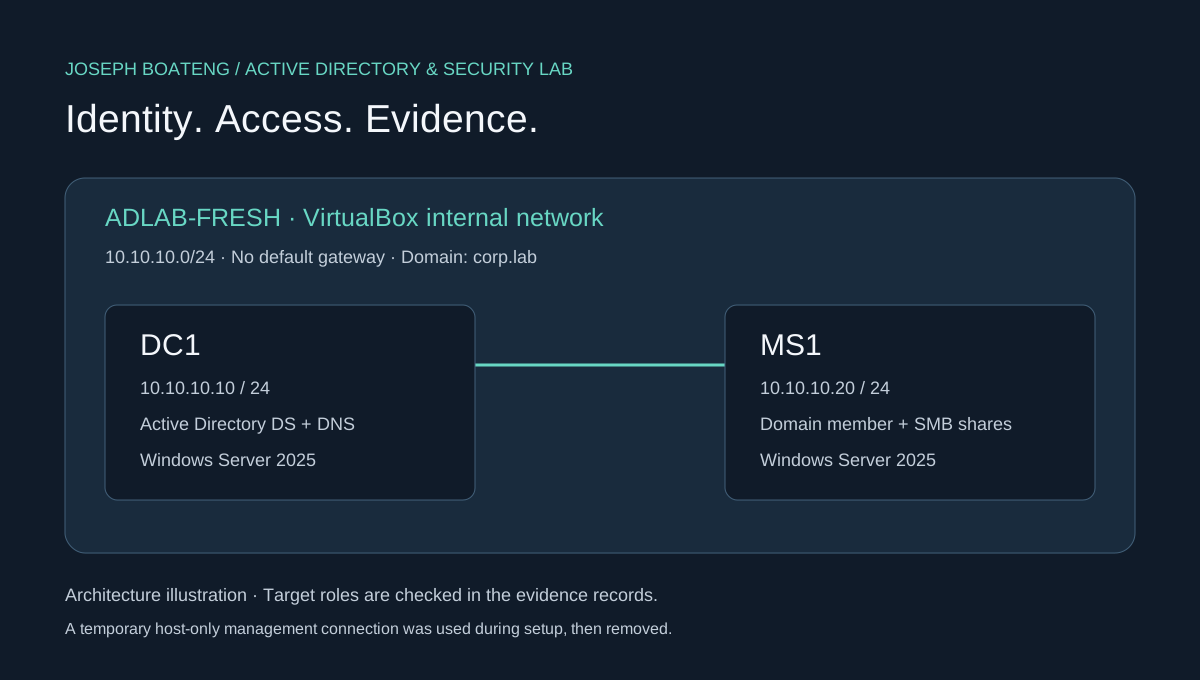
I built a corp.lab domain with two Windows Server 2025 VMs. DC1 handles Active Directory and DNS. MS1 is a domain member with separate HR and Finance file shares. I tested group-based access and traced a controlled account lockout through the Windows Security logs.
Tools: VirtualBox 7.1.8, Windows Server 2025 Standard Evaluation, AD DS, DNS, Group Policy, PowerShell, SMB and Windows Security auditing.
23/23configuration checks passed
5/5SMB permission tests passed
4740lockout event captured on DC1
Recorded test results are loading.
Build steps and evidence
1. Create the domain and join MS1
I installed AD DS and DNS on DC1, created the corp.lab forest, assigned static addresses, and pointed MS1 at DC1 for DNS. MS1 was joined directly into the Servers OU.
Install-WindowsFeature AD-Domain-Services,DNS,GPMC -IncludeManagementTools
Install-ADDSForest -DomainName corp.lab -InstallDNS
Add-Computer -DomainName corp.lab `
  -OUPath 'OU=Servers,OU=Lab,DC=corp,DC=lab' -Credential $cred

# Verification
Resolve-DnsName _ldap._tcp.dc._msdcs.corp.lab -Type SRV
Test-ComputerSecureChannel
dcdiag /test:Advertising /test:Services /test:SysVolCheck
Observed: LDAP discovery returned dc1.corp.lab:389. MS1's secure channel passed. DC1 passed Advertising, Services and SysVolCheck.
Original dcdiag output · Build script
2. Organize users and group-based access
Under OU=Lab, I created Users, Groups, Computers, Servers and Workstations OUs. Four test users were created: alice.adams, ben.brooks, chris.chen and dana.diaz.
Department access follows AGDLP: user → global group → domain-local group → folder permission.
ben.brooks → GG_HR_Users → DL_FS_HR_Modify → HR: Modify
chris.chen → GG_Finance_Users → DL_FS_Finance_Read → Finance: Read

Get-ADGroupMember DL_FS_HR_Modify -Recursive
Get-ADGroupMember DL_FS_Finance_Read -Recursive
Get-ADComputer MS1 | Select-Object DistinguishedName
Observed: recursive membership resolved Ben for HR and Chris for Finance. MS1's computer object was in OU=Servers,OU=Lab.
Exported OU list · Recorded configuration checks
3. Apply password policy and the server GPO
I set the domain password policy and linked LAB - Server Baseline to the Servers OU. The GPO enables all three firewall profiles and sets the CORP Training Lab legal notice on MS1.
| Setting | Recorded value |
|---|
| Minimum password length | 14 characters |
| Complexity / password history | Enabled / 12 passwords |
| Lockout threshold | 5 invalid attempts |
| Lockout duration / observation window | 15 minutes / 15 minutes |
| Domain, Private and Public firewalls | Enabled on both VMs |
Get-ADDefaultDomainPasswordPolicy
Get-GPOReport -All -ReportType Html -Path C:\Lab\Evidence\gpos.html
Get-NetFirewallProfile | Select-Object Name, Enabled
gpupdate /target:computer /force
Observed: MS1 had the configured legal-notice registry value. All firewall profiles were enabled. The lockout behavior was tested separately in step 5.
Original password-policy output · Windows-generated GPO report
4. Create the share and test actual file operations
I created \\MS1.corp.lab\Departments with HR and Finance folders, applied share and NTFS permissions, and enabled access-based enumeration. The tests used ordinary-user credentials over UNC paths so they exercised SMB and NTFS together.
Get-SmbShare Departments
Get-Acl C:\Shares\Departments\HR
Get-Acl C:\Shares\Departments\Finance

# Example operation performed as ben.brooks
Set-Content \\MS1.corp.lab\Departments\HR\ben-proof.txt 'HR modify access verified'
| Identity | Operation | Expected | Observed |
|---|
| ben.brooks | Create a file in HR | Allowed | Allowed |
| ben.brooks | Read Finance | Denied | Denied |
| chris.chen | Read Finance | Allowed | Allowed |
| chris.chen | Create a file in Finance | Denied | Denied |
| chris.chen | Read HR | Denied | Denied |
HR ACL output · Finance ACL output · Timestamped test records · Test script
5. Trigger a lockout and check the audit trail
On MS1, I performed one successful network logon as the disposable dana.diaz account, followed by five wrong-password attempts. MS1 recorded one matching 4624 event and five matching 4625 events. DC1 recorded the account-lockout event below.
Event ID:             4740
TimeCreated:          11/1/2026 7:13:04 AM (guest local time)
Computer:             DC1.corp.lab
Message:              A user account was locked out.
Account Name:         dana.diaz
Caller Computer Name: MS1
Recovery: Get-ADUser dana.diaz -Properties LockedOut confirmed the locked state. I then ran Unlock-ADAccount dana.diaz and confirmed the account was unlocked.
Original event 4740 export · Logon attempts and timestamps · Test and recovery script